VBA Code
Read (Get), Write (Set), Delete, and Show property values for any object.
'*************** Code Start *****************************************************
' module name: mod_Properties_s4p
'-------------------------------------------------------------------------------
' Purpose  : set and get properties, show and delete
' Author   : crystal (strive4peace)
' Code List: www.MsAccessGurus.com/code.htm
' This code: https://msaccessgurus.com/VBA/Code/Properties.htm
' LICENSE  :
'   You may freely use and share this code, but not sell it.
'   Keep attribution. Mark your changes. Use at your own risk.
' Code List: www.msaccessgurus.com/code.htm
'-------------------------------------------------------------------------------
' last update: 251126
'   Set_Property
'   Get_Property
'   IsPropertyDefined
'   Delete_Property
'   Delete_Properties_BeginsWith
'   Show_Properties
'     examples
'   Run_Delete_Properties_BeginsWith
'   Run_Show_Properties
'   Run_Show_Properties_ActiveControl
'   Launch_Set_Property_AppTitle
'   Launch_Get_Property_AppTitle
'   Launch_Get_Property_variousDatabase
'   Set_AllowSpecialKeys
'   Get_CurrentCID
'   Set_CurrentCID
'   Delete_CurrentCID
'   My_SetDefaultDatabaseProperties
'~~~~~~~~~~~~~~~~~~~~~~~~~~~~~~~~~~~~~~~~~~~~~
'           Set_Property
'~~~~~~~~~~~~~~~~~~~~~~~~~~~~~~~~~~~~~~~~~~~~~
Function Set_Property( _
   psPropName As String _
   ,pValue As Variant _
   ,Optional ByVal pnDataType As Long = -99 _
   ,Optional oObject As Object _
   ,Optional bSkipMsg As Boolean = True _
   ) As Boolean
'set or change an object property value to a specified value
'create property if it doesn't exist
'strive4peace
'8-9,130410,160820,170721,191107...1124,191205,251125,6

   ' PARAMETERS
   '  psPropName is the property name to set (database or other object)
   '  pValue is the value for the property
   ' optional:
   '  pDataType is the Data Type: dbBoolean, dbLong, dbText, ...
   '   if not passed, won't create property if not there
   '  oObject = database, field, tabledef, querydef,
   '   or other object with properties
   '   if oObject is not specified, then CurrentDb is used
   '  bSkipMsg = True (default) then don't give user feedback with MsgBox
   '
   ' RETURN
   '  True if successful
   '
   'EXAMPLES
   ' Call Set_Property("AppTitle", sAppTitle, dbText, db)
   '     or Set_Property("AppTitle", sAppTitle, dbText)
   '        where
   '        sAppTitle is defined -- or a literal value
   ' Call Set_Property("AllowAutoCorrect", true, dbBoolean, oControl)
   ' Call Set_Property("Description", "my field description", dbText, oField)

   'set up Error Handler
   On Error GoTo Proc_Err
   Set_Property = False

   Dim bRelease As Boolean _
      ,sMsg As String

   bRelease = False

   If oObject Is Nothing Then
      Set oObject = CurrentDb
      'release object since set
      bRelease = True
   End If

   sMsg = psPropName &  " to " _
      & pValue _
      &  " For " & oObject.Name

   'assume property is defined
   oObject.Properties(psPropName) = pValue
   Set_Property = True

Proc_Done:
   Debug.Print  "Done " & Now(),sMsg
   If Not bSkipMsg Then
      MsgBox sMsg,, "Done"
   End If

Proc_Exit:
   If bRelease = True Then Set oObject = Nothing  'CurrentDb
   Exit Function

Proc_CreateProperty:
   'here because property doesn't exist and needs to be created
   On Error Resume Next  'skip errors
   oObject.Properties.Append oObject.CreateProperty( _
      psPropName,pnDataType,pValue)
   If Err.Number <> 0 Then
      sMsg =  "ERROR: " & sMsg _
         & vbCrLf & vbCrLf & Err.Description
   Else
      'created property successfully
      Set_Property = True
   End If
   GoTo Proc_Done  'not in error state (ref: Ade)

Proc_Err:
   'property not defined, needs to be created and given a value
   If pnDataType > 0 Then
      ' create property and value
      Resume Proc_CreateProperty
   End If
   sMsg =  "ERROR: " & sMsg _
      & vbCrLf & vbCrLf & Err.Description
   Resume Proc_Done
   'dev - to Set Next Statement
   Resume  'dev
End Function

'~~~~~~~~~~~~~~~~~~~~~~~~~~~~~~~~~~~~~~~~~~~~~
'           Get_Property
'~~~~~~~~~~~~~~~~~~~~~~~~~~~~~~~~~~~~~~~~~~~~~
Function Get_Property( _
   psPropName As String _
   ,Optional oObject As Object _
   ,Optional pvDefaultValue As Variant _
   ) As Variant
'read an object property value, or return a specified default value

's4p 8-9...130831,160820,170721,191124,200511,220403,240815, 251124,6
' get the value of a database (or object) property
' pass (optional) object to look somewhere other than CurrentDb
' pass (optional) default value to return if property not set

   ' PARAMETERS
   '  psPropName is the property name to return the value of (database or other object)
   ' OPTIONAL
   '  oObject = database, field, tabledef, querydef,
   '   or other object with properties
   '   if oObject is not specified, then CurrentDb is used
   '  pvDefaultValue is value to return if property cannot be read
   '     returns Null if not specified
   '
   'RETURNS
   ' Value of property
   ' OR
   ' Null (or pvDefaultValue) if property has no value or is not defined

   'EXAMPLES
   '  MyValue = Get_Property("MyDatabasePropertyName")
   '  MyFieldDescription = Get_Property("Description",oField,"")
   ' ?Get_Property("Description",currentdb.TableDefs("MyTable").fields("MyField"))

   On Error GoTo Proc_Err

   Dim bRelease As Boolean
   bRelease = False

   'if passed object is nothing, use CurrentDb
   If oObject Is Nothing Then
      Set oObject = CurrentDb
      bRelease = True
   End If

   'initialize return value
   '  IsMissing used since data type is Variant
   If Not IsMissing(pvDefaultValue) Then
      Get_Property = pvDefaultValue
   Else
      Get_Property = Null
   End If

   'RETURN value of property
   'if this errors out, default value has been set
   Get_Property = oObject.Properties(psPropName)

Proc_Exit:
   If bRelease Then Set oObject = Nothing  'release if not passed
   Exit Function

Proc_Err:
   Resume Proc_Exit

End Function

'~~~~~~~~~~~~~~~~~~~~~~~~~~~~~~~~~~~~~~~~~~~~~
'           IsPropertyDefined
'~~~~~~~~~~~~~~~~~~~~~~~~~~~~~~~~~~~~~~~~~~~~~
Function IsPropertyDefined( _
   ByVal psPropName As String _
   ,Optional oObject As Object _
   ,Optional pvRETURNValue As Variant _
   ) As Boolean
'True if property is defined in oObject and has a value
'  set pvRETURNValue
'121127, 130429, 210811, 251124,6
   'Crystal, strive4peace

   'PARAMETERS
   '  psPropName is the name of the property
   ' oObject can be a database, a Tabledef, a Field...
   '  if it is missing, CurrentDb is used
   '  pvRETURNValue is the value of the property requested

   On Error GoTo Proc_Err

   IsPropertyDefined = False

   Dim bRelease As Boolean
   bRelease = False

   If oObject Is Nothing Then
      Set oObject = CurrentDb
      bRelease = True
   End If

   pvRETURNValue = oObject.Properties(psPropName)

   IsPropertyDefined = True

Proc_Exit:
   If bRelease Then Set oObject = Nothing  'release if CurrentDb
   Exit Function

Proc_Err:
   Resume Proc_Exit

End Function

'~~~~~~~~~~~~~~~~~~~~~~~~~~~~~~~~~~~~~~~~~~~~~
'           Delete_Property
'~~~~~~~~~~~~~~~~~~~~~~~~~~~~~~~~~~~~~~~~~~~~~
Public Sub Delete_Property( _
   psPropName As String _
   ,Optional oObject As Object _
   )
' delete a specified property from oObject
'  NOTE: only delete properties you've created
'140226,191122 strive4peace, 210811, 251124,6

   ' PARAMETERS
   '  psPropName is the property name to delete
   ' OPTIONAL
   '  oObject = database, field, tabledef, querydef,
   '   or other object with properties collection
   '   if oObject is not specified, then CurrentDb is used

   'EXAMPLE
   '  Delete_Property "aCustom_ContactID"
   '     delete the "aCustom_ContactID" property for the current database

   On Error GoTo Proc_Err

   Dim sMsg As String

   Dim bRelease As Boolean
   bRelease = False
   If oObject Is Nothing Then
      Set oObject = CurrentDb
      'release object since set
      bRelease = True
   End If

   With oObject  '251124
      .Properties.Delete (psPropName)
      sMsg =  "Deleted " & psPropName _
         &  " in " & .Name
   End With

   Debug.Print  "*" & Now(),sMsg

Proc_Exit:
   If bRelease Then Set oObject = Nothing  'release if not passed
   Exit Sub

Proc_Err:

   Resume Proc_Exit

End Sub

'~~~~~~~~~~~~~~~~~~~~~~~~~~~~~~~~~~~~~~~~~~~~~
'           Delete_Properties_BeginsWith
'~~~~~~~~~~~~~~~~~~~~~~~~~~~~~~~~~~~~~~~~~~~~~
Sub Run_Delete_Properties_BeginsWith()
'251125 delete database properties
'   Delete_Properties_BeginsWith "aCustom_" 'whatever is your prefix
   Delete_Properties_BeginsWith  "A" 'DON'T DO THIS -- TOO GENERAL
End Sub

Function Delete_Properties_BeginsWith( _
   psBeginsWith As String _
   ,Optional oObject As Object _
   ,Optional pbAsk As Boolean = True _
   ) As Integer
'strive4peace, 251125,6
'delete properties beginning with psBeginsWith
'  NOTE: only delete properties you've created
'     precautions are taken to help prevent you from accidentally deleting something not intended
'     use this at your own risk
   Dim sMsg As String
   Dim sName As String
   Dim sAllNames As String
   Dim asNames() As String

   Dim i As Integer
   Dim iCount As Integer
   Dim bRelease As Boolean

   bRelease = False

   If oObject Is Nothing Then
      Set oObject = CurrentDb
      'release object since set
      bRelease = True
   End If

   Delete_Properties_BeginsWith = 0
   iCount = 0
   'make sure psBeginsWith was passed
   If Len(psBeginsWith) = 0 Then
      MsgBox  "You must specify characters for psBeginsWith",, "Aborting"
      GoTo Proc_Exit
   End If

   'write property names that match psBeginsWith to a list
   For i = (oObject.Properties.Count - 1) To 0 Step -1
      sName = oObject.Properties(i).Name
      If Left(sName,Len(psBeginsWith)) = psBeginsWith Then
         sAllNames = sAllNames &  "," & sName
         iCount = iCount + 1
      End If
   Next i

   If Not iCount > 0 Then
      MsgBox  "No properties match " & psBeginsWith
      GoTo Proc_Exit
   End If

   'strip beginning comma from list
   sAllNames = Mid(sAllNames,2)

   sMsg =  "DELETE " & iCount &  " properties for " & oObject.Name _
      & vbCrLf & vbCrLf &  "beginning with " & psBeginsWith _
      & vbCrLf & vbCrLf & sAllNames

   If Len(psBeginsWith) < 3 _
         Or Not InStr(psBeginsWith, "_") > 0 _
         Or iCount > 9 _
   Then
      sMsg = sMsg & vbCrLf & vbCrLf _
         &  "ARE YOU ABSOLUTELY SURE?"
   End If

   'chance to back out
   If MsgBox(sMsg _
      ,vbYesNo + vbDefaultButton2 _
      , "Delete Properties?") <> vbYes _
   Then GoTo Proc_Exit

   'convert string of names to an array
   asNames = Split(sAllNames, ",")

    For i = LBound(asNames) To UBound(asNames)
      sName = asNames(i)

      If pbAsk Then
         'ask for confirmation before deleting property
         sMsg =  "Delete " & sName &  "?"
         If MsgBox(sMsg _
            ,vbYesNo + vbDefaultButton2 _
            , "Delete Property?") <> vbYes _
         Then GoTo NextProperty
      End If

      oObject.Properties.Delete sName
      Debug.Print  "      -deleted: " & sName
      Delete_Properties_BeginsWith = Delete_Properties_BeginsWith + 1

NextProperty:
   Next i

   sMsg = Delete_Properties_BeginsWith &  " out of " & iCount _
      &  " properties deleted beginning with " & psBeginsWith

   Debug.Print sMsg

Proc_Exit:
   If bRelease Then Set oObject = Nothing  'release if not passed

End Function


'~~~~~~~~~~~~~~~~~~~~~~~~~~~~~~~~~~~~~~~~~~~~~
'           Show_Properties
'~~~~~~~~~~~~~~~~~~~~~~~~~~~~~~~~~~~~~~~~~~~~~
Sub Run_Show_Properties()
'show properties for CurrentDb
   Show_Properties
End Sub

Sub Run_Show_Properties_ActiveControl()
'250127 run for ActiveControl, 1124
   Call Show_Properties(Screen.ActiveControl)
End Sub

Sub Show_Properties( _
    Optional oObject As Object _
    ,Optional psStartCharacters As String =  "" _
   )
'crystal (strive4peace) ...191122, 210811, 251124
'output each property type, name, and value to the Immediate (Debug) window

   ' OPTIONAL PARAMETER
   '  oObject = database, field, tabledef, querydef,
   '   or other object with properties collection
   '   if oObject is not specified, then CurrentDb is used
   '  psStartCharacters is what the property names you want to see start with

   'EXAMPLES
   '  Call Show_Properties( ,"MyPrefix_")
   '     see all database property names that start with "MyPrefix_"
   '  Show_Properties
   '     see all database property information
   '  Show_Properties Currentdb.TableDefs("c_Address")
   '     see all properties for the c_Address table
   '
   On Error Resume Next

   Dim oProperty As Property

   Dim i As Integer
   Dim iCountProperty As Integer

   Dim sAllNames As String
   Dim asPropertyName() As String

   Dim bRelease As Boolean
   bRelease = False
   If oObject Is Nothing Then
      Set oObject = CurrentDb
      'release object since set
      bRelease = True
   End If

   iCountProperty = 0
   sAllNames =  ""

   With oObject
      For Each oProperty In .Properties
         With oProperty
            'show all or filter for start characters
            If psStartCharacters =  "" _
               Or Left(.Name,Len(psStartCharacters)) = psStartCharacters _
            Then
               'string with all the property names
               sAllNames = sAllNames &  "," & .Name
               i = i + 1
            End If
         End With  'oProperty
      Next oProperty
   End With  'oObject

   If sAllNames =  "" Then
      Debug.Print  "No Properties starting with " & psStartCharacters
      GoTo Proc_Exit
   End If

   'strip beginning comma
   sAllNames = Mid(sAllNames,2)
   'split string into array
   asPropertyName = Split(sAllNames, ",")
   iCountProperty = UBound(asPropertyName) - LBound(asPropertyName) + 1

   'use WizHook for a 1-dimension sort
   WizHook.SortStringArray asPropertyName

   '------------ output results to Immediate Window
   Debug.Print String(70, "-")
   If psStartCharacters <>  "" Then
      Debug.Print  " Properties starting with " & psStartCharacters
   Else
      Debug.Print  " Properties";
   End If
   Debug.Print  " for " & oObject.Name
   Debug.Print  "  #. Type   Name = Value"
   Debug.Print String(70, "-");

   With oObject
      For i = LBound(asPropertyName) To UBound(asPropertyName)
         With .Properties(asPropertyName(i))
            Debug.Print
            Debug.Print Format(i, "@@@") &  ". ";
            Debug.Print .Type; Tab(13); .Name;
            Debug.Print  " = " & .Value;
         End With    'oObject.Properties(asPropertyName(i))
      Next i

   End With 'oObject

   Debug.Print
   Debug.Print  "*** " & iCountProperty &  " properties listed",Now()

Proc_Exit:
   Set oProperty = Nothing
   If bRelease Then Set oObject = Nothing  'release if not passed

End Sub
'
'=================================================================
'~~~~~~~~~~~~~~~~~~~~~~~~~~~~~~~~~~~~~~~~~~~~~
'           Launch Examples
'~~~~~~~~~~~~~~~~~~~~~~~~~~~~~~~~~~~~~~~~~~~~~
'~~~~~~~~~~~~~~~~~~~~~~~ Launch_Set_Property_AppTitle
Public Sub Launch_Set_Property_AppTitle()
'170721 s4p
'  set database application title to path\file of current database
'
   Dim sAppTitle As String
   Dim db As DAO.Database
   Set db = CurrentDb

   'set titlebar to path and file of current database
   sAppTitle = db.Name

   Call Set_Property( "AppTitle",sAppTitle,dbText,db)
   Set db = Nothing

End Sub

'~~~~~~~~~~~~~~~~~~~~~~~ Launch_Get_Property_AppTitle
Public Sub Launch_Get_Property_AppTitle()
'170721 s4p
   MsgBox Get_Property( "AppTitle") _
      ,, "AppTitle Property For Current Database"
End Sub

'~~~~~~~~~~~~~~~~~~~~~~~ Launch_Get_Property_variousDatabase
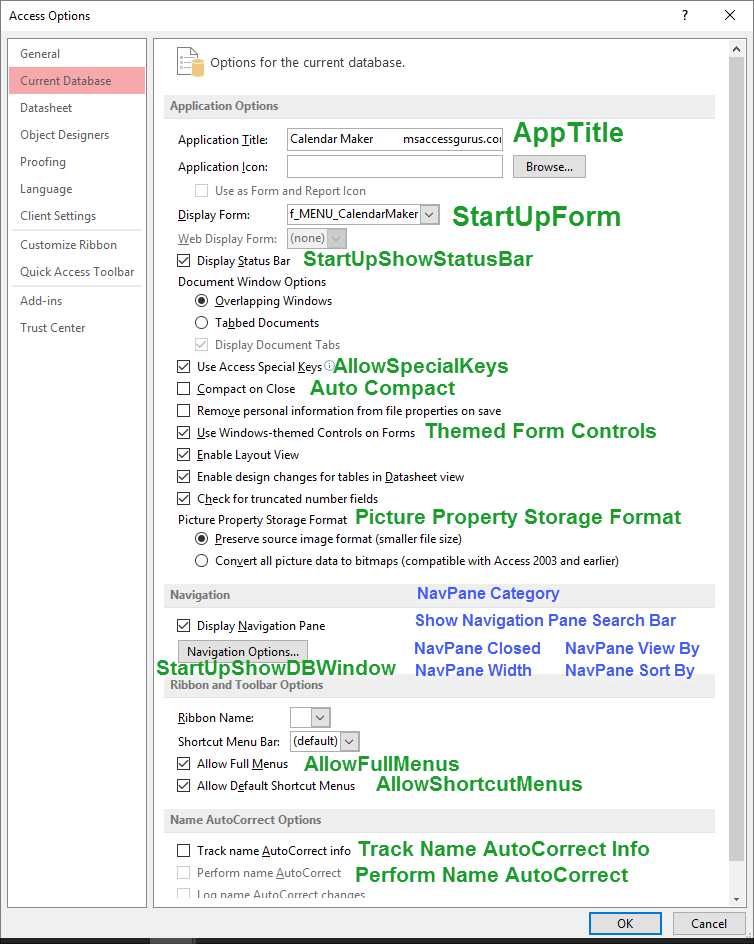
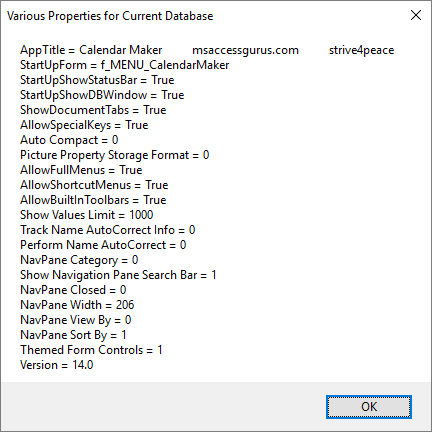
Public Sub Launch_Get_Property_variousDatabase()
'170721 s4p
' write information to the Immediate (Debug) window
' about various current database properties

   On Error GoTo Proc_Err

   Dim db As DAO.Database
   Set db = CurrentDb

   Dim sValue As String _
      ,sPropertyname As String _
      ,sMsg As String _
      ,i As Integer

   Dim avProperty() As Variant  'must be Variant to load with Array function

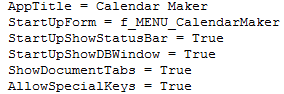
   avProperty = Array( _
      "AppTitle" _
      , "StartUpForm" _
      , "StartUpShowStatusBar" _
      , "StartUpShowDBWindow" _
      , "ShowDocumentTabs" _
      , "AllowSpecialKeys" _
      , "Auto Compact" _
      , "Picture Property Storage Format" _
      , "Themed Form Controls" _
      , "AllowFullMenus" _
      , "AllowShortcutMenus" _
      , "AllowBuiltInToolbars" _
      , "Show Values Limit" _
      , "Track Name AutoCorrect Info" _
      , "Perform Name AutoCorrect" _
      , "NavPane Category" _
      , "Show Navigation Pane Search Bar" _
      , "NavPane Closed" _
      , "NavPane Width" _
      , "NavPane View By" _
      , "NavPane Sort By" _
      , "Version" _
      )

   sMsg =  ""

   For i = LBound(avProperty) To UBound(avProperty)
      sPropertyname = avProperty(i)
      'call Get_Property
      sMsg = sMsg & vbCrLf _
         & Space(3) & sPropertyname _
         &  " = " _
         & Get_Property(sPropertyname,db)
   Next i

   Debug.Print  "*** Various Properties For " _
      & db.Name _
      &  ", " & Now() _
      & sMsg
   MsgBox sMsg,, "Various Properties For Current Database"

Proc_Exit:
   On Error Resume Next
   Set db = Nothing

   Exit Sub

Proc_Err:
   MsgBox Err.Description,, _
        "ERROR " & Err.Number _
        &  "   Launch_Get_Property_variousDatabase"

   Resume Proc_Exit
   Resume

End Sub
'~~~~~~~~~~~~~~~~~~~~~~~~~~~~~~~~~~~~~~~~~~~~~
'     set properties in another database
'~~~~~~~~~~~~~~~~~~~~~~~ Set_AllowSpecialKeys to True in other database
Sub Set_AllowSpecialKeys()
   Dim db As DAO.Database
   '           -------------------- customize path\file for your database
   Set db = OpenDatabase( "C:\TEMP\MicrosoftAccessDatabase.accdb")
   'False=don't skip message
   Call Set_Property( "AllowSpecialKeys",True,dbBoolean,db,False)
   db.Close
   Set db = Nothing
End Sub

'~~~~~~~~~~~~~~~~~~~~~~~~~~~~~~~~~~~~~~~~~~~~~
'           Specific Examples
'~~~~~~~~~~~~~~~~~~~~~~~~~~~~~~~~~~~~~~~~~~~~~
'     set, get, or delete a property called contact_CID
'~~~~~~~~~~~~~~~~~~~~~~~ get the value of "contact_CID"
Function Get_CurrentCID(Optional pvDefaultValue As Long = 0) As Long
   Get_CurrentCID = Get_Property( "contact_CID",,pvDefaultValue)
End Function
'~~~~~~~~~~~~~~~~~~~~~~~ set the value of "contact_CID"
Sub Set_CurrentCID(Optional pnCID As Long)
   Call Set_Property( "contact_CID",pnCID,dbLong)
End Sub
'~~~~~~~~~~~~~~~~~~~~~~~ delete the "contact_CID" database property
Sub Delete_CurrentCID(Optional pnCID As Long)
   Call Delete_Property( "contact_CID")
End Sub

'******************************************************
'              CUSTOM - RUN when CREATING a NEW database
'******************************************************
' this is where you can define your custom database properties
' this will need to be run each time you
'   create a copy of the database by importing objects
'   (since DATABASE PROPERTIES ARE NOT IMPORTED!!!)
'~~~~~~~~~~~~~~~~~~~~~ My_SetDefaultDatabaseProperties
' CUSTOMIZE
'
Sub My_SetDefaultDatabaseProperties( _
    Optional pbSkipMsg As Boolean = True _
   ,Optional pbResetAll As Boolean = False _
   )
'100829...250921,1126

   ' PARAMETERS
   ' pbSkipMsg = True: skip user interaction messages
   ' pbResetAll, False = skip if property already set
   '
   ' CALLS
   '     Set_Property
   '     IsPropertyDefined if not pbResetAll

   On Error GoTo Proc_Err

   Dim db As DAO.Database

   Set db = CurrentDb

   Dim i As Integer _
      ,sPropName As String _
      ,nPropType As Long _
      ,varValue As Variant

   '~~~~~~~~~~~~~~~~~~~~~~~~~~~~~~~~~~~~~~~~~~~ property names

   For i = 1 To 3  '-------------- customize for however many properties you have

      Select Case i

      '------------------------------------
      Case 1
         sPropName =  "aCustom_SomeBoolean"
         nPropType = dbBoolean
         varValue = False

      Case 2
         sPropName =  "aCustom_UserID"
         nPropType = dbLong
         varValue = -99  'must have a value

      Case 3
         sPropName =  "aCustom_SomeString"
         nPropType = dbText
         varValue =  " " 'cannot be ZLS (zero-length string)

      End Select

      If Not pbResetAll Then
         'skip if already has a value
         If IsPropertyDefined(sPropName,db) Then
            GoTo NextProperty
         End If
      End If

      Call Set_Property(sPropName,varValue,nPropType,db,pbSkipMsg)

NextProperty:
   Next i

   If Not pbSkipMsg Then
      MsgBox  "Default Properties are set",, "Done"
   End If

Proc_Exit:
   Set db = Nothing
   Exit Sub

Proc_Err:
   MsgBox Err.Description,, _
        "ERROR " & Err.Number _
        &  "   My_SetDefaultDatabaseProperties"

   Resume Proc_Exit

   'if you want to single-step code to find error, CTRL-Break at MsgBox
   'then set this to be the next statement
   Resume
End Sub

'*************** Code End *******************************************************
Keywords and comments in code were colored with this free
Color Code add-in
Goto Top
Logic
This module has several procedures that are helpful
when using properties to store information
Goto Top
Goto Top
Reference
Microsoft Help
Help: Properties object
Help: Properties.Append method
Help: Application.CurrentDb object
Help: Debug
object
Help: Debug.Print
method
Help: DBEngine.OpenDatabase method
Help: Array function
Goto Top
Backstory
I use a version of this module in almost every project I create.
Hope it's useful for you too ~
Thanks to Colin Riddington for the name of a property I couldn't figure out ... and the reason?
Properties don't exist until they're created.
Some database properties always are there, and I figured logging (however I was wrong -- USED TO default to true but now it's not set)
would be one of them if it was stored that way.
After manually setting Log Name AutoCorrect Changes to True (ticked in the Options),
that and about 20 more database properties were also set.
To know that, I ran Show_Properties (results in Immediate Window) for the CurrentDb before and after.
Goto Top
Share with others
Here's the link for this page in case you want to copy it
and share it with someone:
https://msaccessgurus.com/VBA/Code/Properties.htm
or in old browsers:
http://www.msaccessgurus.com/VBA/Code/Properties.htm
Goto Top