VBA
cbf
Option Compare Database
Option Explicit
'251125...30
'*************** Code Start *****************************************************
' cbf: f_LatestRecord_Contacts
'-------------------------------------------------------------------------------
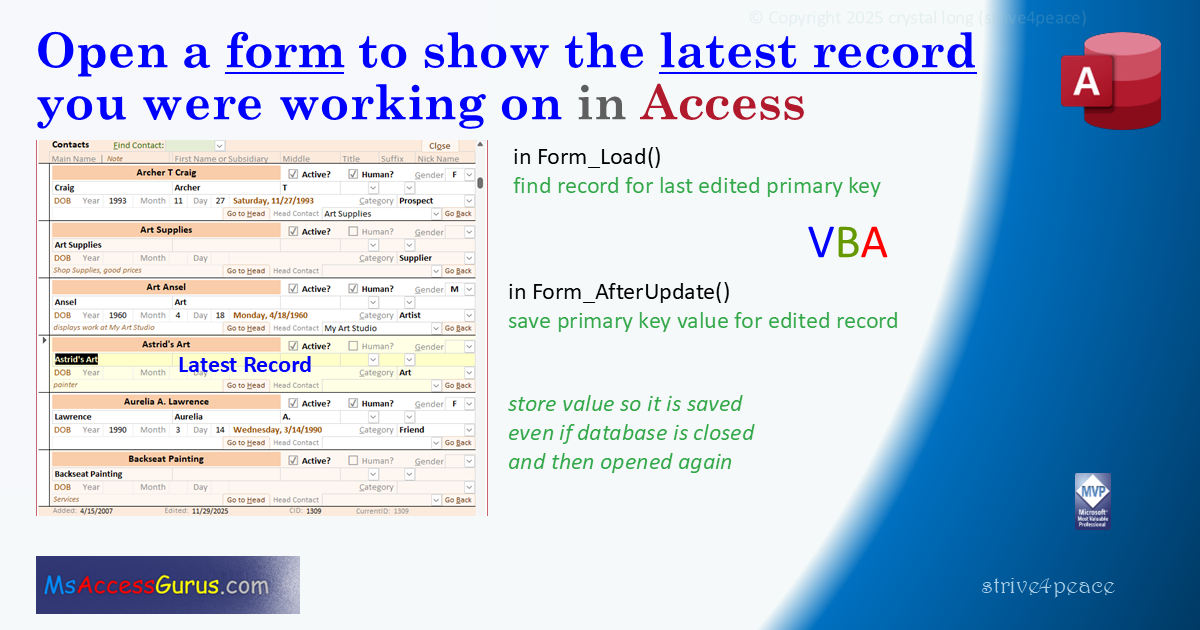
' Purpose  : demonstrates opening form to latest record edited using Load event
'              find record for last edited primary key
'              uses a database property to store value
'            other things are also done with this form
'              highlight current record (VBA + Conditional Formatting)
'              drop combo lists more conveniently
'              keep track of date/time a record was edited
' Author   : crystal (strive4peace)
' This code: https://msaccessgurus.com/VBA/Code/Form_LatestRecord.htm
' Code List: https://msaccessgurus.com/code.htm
' LICENSE  :
'   You may freely use and share this code, but not sell it.
'   Keep attribution. Mark your changes. Use at your own risk.
'-------------------------------------------------------------------------------
'  Form_AfterUpdate: save current primary key value in database property aMy_LatestCID
'  Form_Load: read value saved for aMy_LatestCID and find record
'-------------------------------------------------------------------------------
' uses FindRecordN, code here:
'     https://msaccessgurus.com/VBA/Code/Form_FindRecordN.htm
'-------------------------------------------------------------------------------
'                             Module
'-------------------------------------------------------------------------------
Private MyDb As DAO.Database  'reuse CurrentDb

'-------------------------------------------------------------------------------
'                              Form
'-------------------------------------------------------------------------------
'---------- Form_Load
Private Sub Form_Load()
'sort records, find last record edited
'181008 strive4peace, 251126...30

   'CALLs
   '  GetDatabaseProperty_LatestCID
   '  FindRecordN

   'sort by name
   With Me
      .OrderBy =  "[NameA] & [NameB] & [Nickname] & [MainName] & [Sufx] & [cTitle]"
      .OrderByOn = True
   End With

   'get primary key value of last record edited, CID
   Dim nCID As Long
   ' -99 is default if database property isn't set
   nCID = GetDatabaseProperty_LatestCID()
   If nCID <> -99 Then
      'find the record
      Call FindRecordN(Me, "CID",,nCID)
   End If

End Sub

'---------- Form_AfterUpdate
Private Sub Form_AfterUpdate()
'251126...30
   'CALLs
   '  SetDatabaseProperty_LatestCID

   'save primary key for latest record edited, CID
   Call SetDatabaseProperty_LatestCID(Me.CID)

   'requery combo(s) to find records
   Me.Find_Contact.Requery

End Sub

'---------- Form_Current
Private Sub Form_Current()
'181012 strive4peace, 251129
   'for highlighting current record
   Me.CurrentID = Nz(Me.CID,-99)
   'Conditional Formatting on txtHighlight
   '  if
   '  Nz([CurrentID],0)=Nz([CID],-99)
   '  then
   '  background is yellow
End Sub

'---------- Form_BeforeUpdate
Private Sub Form_BeforeUpdate(Cancel As Integer)
'251126
   'save date/time record was edited
   Me.dtmEdit = Now
End Sub

'---------- Form_Close
Private Sub Form_Close()
'251126
   'release database object
   Set MyDb = Nothing
End Sub

'-------------------------------------------------------------------------------
'                              Close button
'-------------------------------------------------------------------------------
Private Sub cmd_Close_Click()
'250831, 1125
   With Me
      'save record if changes have been made
      If .Dirty Then .Dirty = False
      'close form
      DoCmd.Close acForm,.Name
   End With
End Sub

'-------------------------------------------------------------------------------
'                              Find / Go to
'-------------------------------------------------------------------------------
'---------- Find_Contact_AfterUpdate
Private Sub Find_Contact_AfterUpdate()
'250831 strive4peace
   'find record for whatever value is in the combobox
   'set focus to the MainName control after finding
   Call FindRecordN(Me, "CID", "MainName")
End Sub

'---------- cmd_GoBack_Click
Private Sub cmd_GoBack_Click()
'250831
   Dim nCID_last As Long
   'PK value of last record to go back to
   nCID_last = Nz(TempVars!tvCID_last,-99)
   If nCID_last > 0 Then
      'before leaving record, save PK value of current record
      'to come back to
      TempVars!tvCID_last = Nz(Me.CID,-99)
      'find record, set focus to the Note control
      Call FindRecordN(Me, "CID", "NoteCtc",nCID_last)
   End If
End Sub

'---------- cmd_GotoHead_Click
Private Sub cmd_GotoHead_Click()
'250831,251125

   Dim nCID As Long
   With Me.CID_  'parent contact
      If IsNull(.Value) Then
         .SetFocus
         MsgBox  "Choose a Head contact if you want to go there" _
            ,, "Head contact not filled"
         .Dropdown
         'EXIT
         Exit Sub
      End If
      nCID = .Value
   End With
   'store CID before moving for Go Back
   TempVars!tvCID_last = CLng(Nz(Me.CID,-99))
   'find record
   Call FindRecordN(Me, "CID", "NoteCtc",nCID)
End Sub

'-------------------------------------------------------------------------------
'                  NotInList
'-------------------------------------------------------------------------------
Private Sub CatID_NotInList( _
   NewData As String,Response As Integer)
'if Category is not in list, then add record
' modified from code here:
'  https://msaccessgurus.com/VBA/Code/Combo_NotInList.htm
'251129
   'set up Error Handler
   On Error GoTo Proc_Err

   Dim sSQL As String _
   ,sMsg As String

   'initialize response to error
   Response = acDataErrContinue

   'Ask if user wants to add a new item
   sMsg =  """" & NewData _
      &  """ is not in the current list. " _
      & vbCrLf & vbCrLf _
      &  "Do you want to add it? " _

   'if the user didn't click Yes, then exit
   'so user can change whatever they typed
   If MsgBox(sMsg,vbYesNo, "Add New Data") <> vbYes Then
      GoTo Proc_Exit
   End If

   'SQL statement to add record
   sSQL =  "INSERT INTO c_Category  " _
      &  "(Category)" _
      &  " SELECT """ & NewData &  """;"

'Debug.Print sSQL  'uncomment to debug

   With CurrentDb
      'run the SQL statement
      .Execute sSQL
      'if a record was added, set Response
      If .RecordsAffected > 0 Then
         'set response to data added
         Response = acDataErrAdded
      End If
   End With

Proc_Exit:
   Exit Sub

Proc_Err:
   MsgBox Err.Description,,_
     "ERROR " & Err.Number _
     &  "   CatID_NotInList"
   Resume Proc_Exit
   Resume
End Sub

'-------------------------------------------------------------------------------
'                 Checkboxes and textbox 'labels' with Conditional Formatting
'-------------------------------------------------------------------------------
Private Sub IsActive_Click()
'181011 s4p
   With Me.IsActive
      .Value = Not .Value
   End With
End Sub

Private Sub IsActive_txtLabel_Click()
'181011 s4p
   With Me.IsActive
      .Value = Not .Value
   End With
End Sub

Private Sub IsHuman_Click()
   With Me.IsHuman
      .Value = Not .Value
   End With
End Sub

Private Sub IsHuman_txtLabel_Click()
'181011 s4p
   With Me.IsHuman
      .Value = Not .Value
   End With
End Sub

'-------------------------------------------------------------------------------
'                              Controls for Conditional Formatting
'-------------------------------------------------------------------------------
Private Sub txt_InactiveGray_GotFocus()
'250831
   'if gray background for inactive gets focus, move it
   Me.MainName.SetFocus
End Sub

Private Sub txtHighlight_Click()
'181012 s4p
   'if highlight to indicate current record gets focus, move it
   Me.MainName.SetFocus
End Sub

'-------------------------------------------------------------------------------
'                              drop combo lists
'-------------------------------------------------------------------------------
Private Sub Find_Contact_MouseUp( _
   Button As Integer,Shift As Integer _
   ,X As Single,Y As Single)
'250831
   Call DropMe
End Sub

Private Sub cTitle_GotFocus()
'250831
   Call DropMeIfNull
End Sub
Private Sub cTitle_MouseUp( _
   Button As Integer,Shift As Integer _
   ,X As Single,Y As Single)
'250831
   Call DropMeIfNull
End Sub

Private Sub Sufx_GotFocus()
'250831
   Call DropMeIfNull
End Sub
Private Sub Sufx_MouseUp( _
   Button As Integer,Shift As Integer _
   ,X As Single,Y As Single)
'250831
   Call DropMeIfNull
End Sub

Private Sub CatID_GotFocus()
'250831
   Call DropMeIfNull
End Sub
Private Sub CatID_MouseUp( _
   Button As Integer,Shift As Integer _
   ,X As Single,Y As Single)
'250831
   Call DropMe
End Sub

Private Sub Gender_GotFocus()
'250831
   Call DropMeIfNull
End Sub
Private Sub Gender_MouseUp( _
   Button As Integer,Shift As Integer _
   ,X As Single,Y As Single)
'250831
   Call DropMe
End Sub

Private Sub CID__GotFocus()
'250831
   Call DropMeIfNull
End Sub
Private Sub CID__MouseUp( _
   Button As Integer,Shift As Integer _
   ,X As Single,Y As Single)
'250831
   Call DropMeIfNull
End Sub

Private Sub Find_Contact_GotFocus()
'251129
   Call DropMe
End Sub
'-------------------------------------------------------------------------------
'           DropMe and DropMeIfNull
'           could be Public -- change Me to Screen
'-------------------------------------------------------------------------------
'~~~~~~~~~~~~~~~~~~~~~~~~~~~~~~~~~~~~~~~~~~~~~
'           DropMeIfNull
'~~~~~~~~~~~~~~~~~~~~~~~~~~~~~~~~~~~~~~~~~~~~~
Private Function DropMeIfNull( _
   ) As Boolean
' s4p, Drop list for Combo Box if no value
   On Error Resume Next
'   With Screen.ActiveControl
   With Me.ActiveControl
      If IsNull(.Value) Then .Dropdown
   End With
End Function
'~~~~~~~~~~~~~~~~~~~~~~~~~~~~~~~~~~~~~~~~~~~~~
'           DropMe
'~~~~~~~~~~~~~~~~~~~~~~~~~~~~~~~~~~~~~~~~~~~~~
Private Function DropMe()
's4p. Drop list for Combo Box
   On Error Resume Next
'   Screen.ActiveControl.Dropdown
   Me.ActiveControl.Dropdown
End Function

'-------------------------------------------------------------------------------
'  SetDatabaseProperty_LatestCID and GetDatabaseProperty_LatestCID are
'        customized private versions of code here:
'  mod_Properties_s4p
'  https://msaccessgurus.com/VBA/Code/Properties.htm
'~~~~~~~~~~~~~~~~~~~~~~~~~~~~~~~~~~~~~~~~~~~~~
'           SetDatabaseProperty_LatestCID
'~~~~~~~~~~~~~~~~~~~~~~~~~~~~~~~~~~~~~~~~~~~~~
Private Sub SetDatabaseProperty_LatestCID(pnValue As Long)
'set database property value
'create if it doesn't exist yet
'251129 s4p

   'set up Error Handler
   On Error GoTo Proc_Err

   If MyDb Is Nothing Then Set MyDb = CurrentDb

   'assume property is defined in current database
   MyDb.Properties( "aMy_LatestCID") = pnValue

Proc_Exit:
   Exit Sub

Proc_CreateProperty:
   'here because property doesn't yet exist
   On Error Resume Next
   MyDb.Properties.Append MyDb.CreateProperty( _
      "aMy_LatestCID",4,pnValue)
   GoTo Proc_Exit

Proc_Err:
   ' error reading value
   ' create property with value
   Resume Proc_CreateProperty

End Sub

'~~~~~~~~~~~~~~~~~~~~~~~~~~~~~~~~~~~~~~~~~~~~~
'           GetDatabaseProperty_LatestCID
'~~~~~~~~~~~~~~~~~~~~~~~~~~~~~~~~~~~~~~~~~~~~~
Private Function GetDatabaseProperty_LatestCID() As Long
'return database property value for "aMy_LatestCID" OR -99
'251129 s4p

   'RETURNS
   ' Value of property OR -99 if property is not defined

   On Error GoTo Proc_Err

   If MyDb Is Nothing Then Set MyDb = CurrentDb

   'initialize return value
   GetDatabaseProperty_LatestCID = -99

   'replace Return with actual value if database property is set
   GetDatabaseProperty_LatestCID = MyDb.Properties( "aMy_LatestCID")

Proc_Exit:
   Exit Function

Proc_Err:
   Resume Proc_Exit

End Function

'*************** Code End *******************************************************
'
'     FORM NOTES
'calculated expression for Contact name
'  (  didn't store calculated field in table definition
'     so this database will also open with 2007       )
' Contact: ([NameA]+" ") & ([NameB]+" ") & (" ("+[Nickname]+") ") & [MainName] & (", "+[Sufx]) & (", "+[cTitle])
' AllNames (sort by): [NameA] & [NameB] & [Nickname] & [MainName] & [Sufx] & [cTitle]
'
' Access 2007 version uses checkboxes instead of textboxes with Unicode in the Format property
' Code was generated with colors using the free
Color Code add-in for Access
Goto Top