VBA
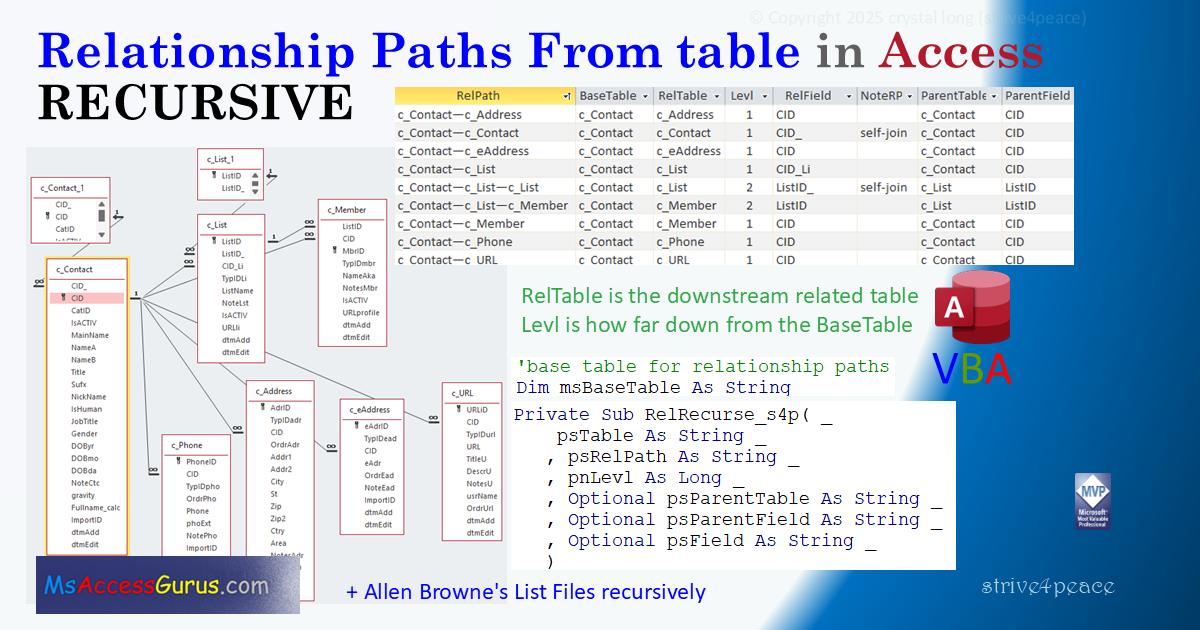
Relationship paths
standard module: s4p_mod_RelPath_Recurse
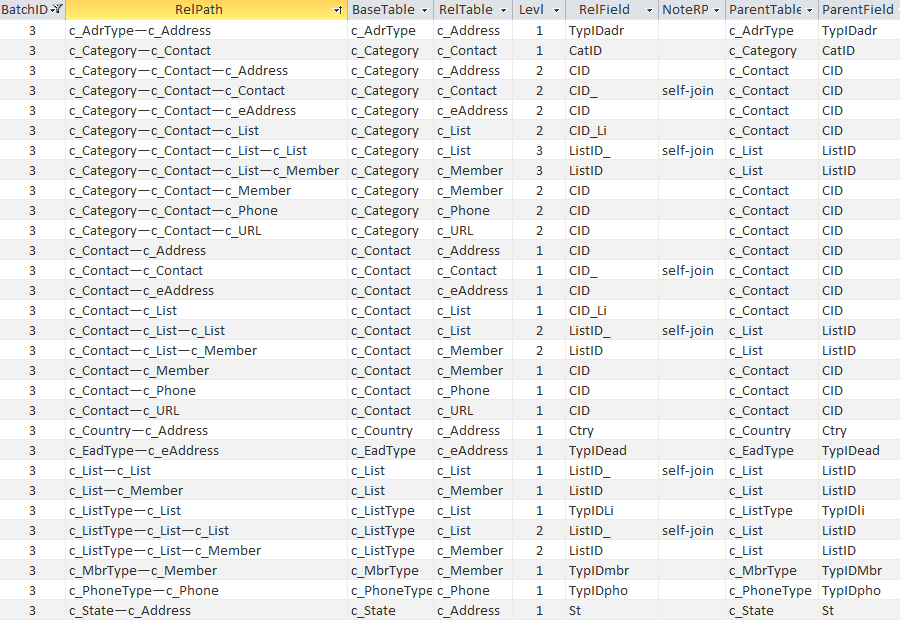
saves information in the s4p_RelPath table
Option Compare Database
Option Explicit
'260129
'*************** Code Start ****************************************************
' s4p_mod_RelPath_Recurse
'-------------------------------------------------------------------------------
' Purpose  : document relationship paths from one or more base tables
'              needs Access table to store results: s4p_RelPath
' Author   : crystal (strive4peace)
' This code: https://msaccessgurus.com/tool/RelationshipPaths.htm
' Code List: https://msaccessgurus.com/code.htm
' LICENSE  :
'   You may freely use and share this code, but not sell it.
'   Keep attribution. Mark your changes. Use at your own risk.
'-------------------------------------------------------------------------------
'  procedures
'     DoRelPath_All_s4p          document relationship paths for all tables
'     RelRecurse_s4p             Recursive function
'     DoRelPath_OneTable_s4p     document relationship paths for one base table
'-------------------------------------------------------------------------------
'  to use, import:
'     s4p_RelPath table
'     s4p_mod_RelPath_Recurse module (this module)
'  into your database.
'  Compile, Save, and run DoRelPath_All_s4p OR DoRelPath_OneTable_s4p
'-------------------------------------------------------------------------------
'                             Module
'-------------------------------------------------------------------------------
Dim mDb As DAO.Database  'CurrentDb
Dim mRs_RelPath As DAO.Recordset  's4p_RelPath table

Dim mnBatchID As Long  'identifying number for batch of records
Dim msBaseTable As String  'base table for relationship paths

'-------------------------------------------------------------------------------
'                             DoRelPath_All_s4p
'-------------------------------------------------------------------------------
Public Sub DoRelPath_All_s4p()
's4p 260112,13,25, 28
' loop through ALL tables
' store relationship paths and other relation information
'     in s4p_RelPath

   'Click HERE
   'press F5 to Run

   On Error GoTo Proc_Err

   Dim tdf As DAO.TableDef

   Dim sSql As String

   Set mDb = CurrentDb
   'recordset for table to store information
   Set mRs_RelPath = mDb.OpenRecordset( "s4p_RelPath",dbOpenDynaset)

   'get max BatchID and increment
   mnBatchID = Nz(DMax( "BatchID", "s4p_RelPath"),0) + 1

   'loop tables
   For Each tdf In mDb.TableDefs
      With tdf
         msBaseTable = .Name
         'set StatusBar text
         SysCmd acSysCmdSetStatus,msBaseTable
         If (Left(.Name,4) <>  "msys") _
                  And (Left(.Name,1) <>  "{") _
                  And (Left(.Name,1) <>  "~") _
         Then
            'add records
            '1st time, rel path is the base table
            Call RelRecurse_s4p(msBaseTable,msBaseTable,0)
         End If
      End With  'tdf

proc_NextTable:
   Next tdf

   'open table with results
   'filter for BatchID if has records from more than one run
   DoCmd.OpenTable  "s4p_RelPath"
   MsgBox  "Done documenting all relationship paths to s4p_RelPath",, "Done"

proc_exit:
   On Error Resume Next
   Set tdf = Nothing
   mRs_RelPath.Close
   Set mRs_RelPath = Nothing
   Set mDb = Nothing
   'clear StatusBar text
   SysCmd acSysCmdClearStatus
   Exit Sub

Proc_Err:
   MsgBox Err.Description,,_
     "ERROR " & Err.Number _
     &  "   DoRelPath_All_s4p"

   Resume proc_exit
   Resume
End Sub

'-------------------------------------------------------------------------------
'                             RelRecurse_s4p
'-------------------------------------------------------------------------------
Private Sub RelRecurse_s4p( _
    psTable As String _
   ,psRelPath As String _
   ,pnLevl As Long _
   ,Optional psParentTable As String _
   ,Optional psParentField As String _
   ,Optional psField As String _
   )
's4p 260112,13,24,25,26
'write rel paths to a table, Recurse to drill down levels
   'PARAMETERs
   '  psTable is the child tablename to get relationships for
   '  psRelPath is Table1—Table2—... (uses Em dash)
   '  pnLevl is how down the chain psTable is in psRelPath from base table
   '  psParentTable is the parent table (may be the base table)
   '  psParentField is the field in the parent table for the relation
   '  psField is the field in the child table for the relation

   On Error GoTo Proc_Err

   Dim rs As DAO.Recordset

   Dim sSql As String _
      ,sRelPath As String _
      ,nLevl As Long

   '1st time, only one table (parent=child) so no relationship
   With mRs_RelPath
      If pnLevl <> 0 Then
         'add record
         .AddNew
            !BatchID = mnBatchID
            If Len(psRelPath) <= 255 Then
               !RelPath = psRelPath
            Else
               !LongRelPath = psRelPath
            End If
            !BaseTable = msBaseTable
            !RelTable = psTable
            !ParentTable = psParentTable
            !ParentField = psParentField
            !RelField = psField
            !Levl = pnLevl
         .Update
      End If
   End With

   'relationships where psTable is the parent
   sSql =  "SELECT m.szReferencedObject AS Table_Parent " _
      &  ",m.szObject AS Table_Child " _
      &  ",m.szReferencedColumn AS Field_Parent " _
      &  ",m.szColumn AS Field_Child " _
      &  " FROM MSysRelationships AS m " _
      &  " WHERE(m.szReferencedObject = '" & psTable &  "')" _
      &  " ORDER BY m.szObject"

   Set rs = mDb.OpenRecordset(sSql,dbOpenSnapshot)

   With rs
      'loop related relationships
      Do While Not .EOF
         ' increment level
         nLevl = pnLevl + 1
         'add child table to relationship path
         'ChrW(8212) is Unicode for Em Dash (dash width of capital M)
         sRelPath = psRelPath & ChrW(8212) & !Table_Child
         'see if parent and child table names are different

         If !Table_Child <> psTable Then
            ' RECURSE
            ' child table will become the parent
            Call RelRecurse_s4p(!Table_Child,sRelPath,nLevl _
               ,!Table_Parent,!Field_Parent,!Field_Child)
         Else
            'self-join relationship
            'stop recursing this relationship path
            With mRs_RelPath
               'add record
               .AddNew
                  !BatchID = mnBatchID
                  If Len(sRelPath) <= 255 Then
                     !RelPath = sRelPath
                  Else
                     !LongRelPath = sRelPath
                  End If
                  !Levl = nLevl
                  !BaseTable = msBaseTable
                  !RelTable = rs!Table_Child
                  !RelField = rs!Field_Child
                  !ParentTable = rs!Table_Parent
                  !ParentField = rs!Field_Parent
                  !NoteRP =  "self-join"
               .Update
            End With
         End If

         .MoveNext
      Loop
      .Close
   End With

proc_exit:
   On Error Resume Next
   rs.Close
   Set rs = Nothing
   Exit Sub

Proc_Err:
   MsgBox Err.Description,,_
     "ERROR " & Err.Number _
     &  "   RelRecurse_s4p"

   Resume proc_exit
   Resume
End Sub

'-------------------------------------------------------------------------------
'                             DoRelPath_OneTable_s4p
'-------------------------------------------------------------------------------
Public Sub DoRelPath_OneTable_s4p(psTable As String)
'260112,3...28 s4p store info in the s4p_RelPath table
' store relationship paths and other relation information for ONE base table

   'PARAMETER
   '  psTable is the tablename to document relationships for

   Dim sSql As String

   Set mDb = CurrentDb
   'open table to store information
   Set mRs_RelPath = mDb.OpenRecordset( "s4p_RelPath",dbOpenDynaset)

   'get max BatchID and increment
   mnBatchID = Nz(DMax( "BatchID", "s4p_RelPath"),0) + 1

   msBaseTable = psTable

   Call RelRecurse_s4p(psTable,psTable,0)

   mRs_RelPath.Close
   Set mRs_RelPath = Nothing
   Set mDb = Nothing

   MsgBox  "Done documenting relationship paths in s4p_RelPath for " _
      & psTable,, "Done"

End Sub

'*************** Code End ******************************************************
http://allenbrowne.com/ser-59.html
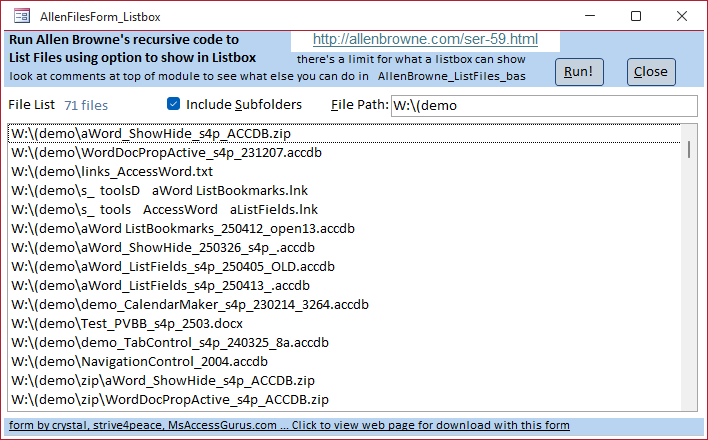
List files recursively by Allen Browne
cbf: AllenFilesForm_Listbox
Option Compare Database
Option Explicit
'------------------------------------------------------------------------------
' cbf: AllenFilesForm_Listbox
'  Run Allen Browne's recursive code to
'  list files using option to show in Listbox
'  to copy a file path\name, right-click on an entry and Copy
'------------------------------------------------------------------------------
'   List files recursively, by Allen Browne
'   http://allenbrowne.com/ser-59.html
'------------------------------------------------------------------------------
'  procedures:
'     cmd_Run_Click
'     cmd_Close_Click
'------------------------------------------------------------------------------
' form by crystal, strive4peace, MsAccessGurus.com
' web page for download with this form
'  https://msaccessgurus.com/tool/RelationshipPaths.htm
'------------------------------------------------------------------------------

Private Sub cmd_Run_Click()
'260126,8 s4p
   Dim sPath As String

   Dim sMsg As String
   Dim sMsg2 As String
   Dim sMsg3 As String
   Dim nCount As Long

   With Me
      If IsNull(.txt_FilePath) Then
         MsgBox  "Please specify the path you want to see files for" _
            ,, "Missing File Path"
         Exit Sub
      End If

      .Check_MoreFiles = False
      .lstFileList.SetFocus
      .lstFileList.RowSource =  ""
      .txt_CountFiles.Requery

      sPath = TrailingSlash(.txt_FilePath)
      sMsg =  "Get list of files for " & sPath

      If .Checkbox_IncludeSubfolders Then
         sMsg2 = vbCrLf &  "Including subfolders, " _
         &  "Be patient, this may take awhile"
         sMsg = sMsg &  " ..."
         sMsg3 =  " ... including subfolders"
      End If

      sMsg = sMsg _
         & vbCrLf &  "  ?" _
         & sMsg2 _
         & vbCrLf & vbCrLf &  "Look at StatusBar in lower left" _
            &  " to see if its still running"

      If MsgBox(sMsg,vbYesNo, "List Files") _
         = vbNo Then GoTo proc_exit
      SysCmd acSysCmdSetStatus _
         , "RUNNING get list of files for specified path" & sMsg3

      'recursively list files, sets gnCount
      Call ListFiles(sPath _
         , "*.*",.Checkbox_IncludeSubfolders _
         ,.lstFileList)

      'gnCount was added to Allen's code
      'and is the total number of files found
      'nCount is how many files are in the listbox
      nCount = .lstFileList.ListCount
      .Check_MoreFiles = (gnCount > nCount)  'control not visible

      DoEvents
      .Refresh

   End With

   'DoEvents seems to be needed twice, before and after form Refresh
   'so the count of files is displayed before the MsgBox pops up
   ' txt_CountFiles =Format([lstFileList].[ListCount],"#,##0") _
                    & IIf([Check_MoreFiles]," +more","") &  " files"
   DoEvents

   SysCmd acSysCmdSetStatus, "Done"
   MsgBox  "Done listing files, " & Format(gnCount, "#,##0") _
      &  " files were found." _
      & IIf(nCount < gnCount,vbCrLf & vbCrLf _
      &  "Only " & nCount &  " files are shown", "") _
      ,, "Done"

proc_exit:

   SysCmd acSysCmdClearStatus
End Sub

Private Sub cmd_Close_Click()
'260129
   DoCmd.Close acForm,Me.Name
End Sub

'*************** Code End ******************************************************
Goto Top
module: AllenBrowne_ListFiles_bas
Option Compare Database
Option Explicit

' AllenBrowne_ListFiles_bas
'  crystal added comments, line breaks, and Public gnCount As Long
'------------------------------------------------------------------------------
'   List files recursively, by Allen Browne
'   http://allenbrowne.com/ser-59.html
'------------------------------------------------------------------------------
'  procedures:
'     ListFiles
'     FillDir
'     TrailingSlash
'------------------------------------------------------------------------------
'   -- In the Immediate window --
'
'   To list the files in C:\Data,
'   open the Immediate Window (Ctrl+G), and enter:
'       Call ListFiles("C:\Data")
'
'   To limit the results to zip files:
'       Call ListFiles("C:\Data", "*.zip")
'
'   To include files in subdirectories as well:
'       Call ListFiles("C:\Data", , True)
'
'   -- In a list box --
'
'   To show the files in a list box:
'
'       Create a new form.
'       Add a list box, and set these properties:
'           Name              lstFileList
'           Row Source Type   Value List
'       Set the On Load property of the form to:
'           [Event Procedure]
'              Click the Build button (...) beside this.
'              Access opens the code window.
'              Set up the event procedure like this:
'           Private Sub Form_Load()
'               Call ListFiles("C:\Data", , , Me.lstFileList)
'           End Sub
'
'   -- How it works --
'
'   ListFiles() is the main routine.
'   It uses a collection to demonstrate how the file names
'   can all be collected, and then output
'   in different ways (list box, table, immediate window.)
'
'   FillDir() does the work of looping through the files
'   in a folder that meet the file specification,
'   and adding them to the collection.
'   If we are to include the subfolders as well,
'   the second part loops through all the files again
'   to identify those that are directories.
'   It ignores the "." and ".." entries,
'   uses GetAttr() to identify the directories,
'   and adds them to the colFolders collection.
'   Then for each of the folders in this collection,
'   the function calls itself again to handle the files in that folder.
'   If that folder contains subfolders also,
'   the function will continue to call itself recursively,
'   to whatever depth is required.
'
'   The TrailingSlash() function just ensures that the folder names
'   we are processing end with the slash character.
'------------------------------------------------------------------------------
'   Public / Global
'------------------------------------------------------------------------------
Public gnCount As Long  ' ~~~ added by crystal, number of files found
'------------------------------------------------------------------------------
'   ListFiles
'------------------------------------------------------------------------------
Public Function ListFiles(strPath As String,_
    Optional strFileSpec As String,_
    Optional bIncludeSubfolders As Boolean,_
    Optional lst As ListBox)
On Error GoTo Err_Handler
    'Purpose:   List the files in the path.
    'Arguments: strPath = the path to search.
    '           strFileSpec = "*.*" unless you specify differently.
    '           bIncludeSubfolders: If True, returns results from subdirectories of strPath as well.
    '           lst: if you pass in a list box, items are added to it.
    '               If not, files are listed to immediate window.
    '               The list box must have its Row Source Type property set to Value List.
    'Method:    FilDir() adds items to a collection, calling itself recursively for subfolders.
    Dim colDirList As New Collection
    Dim varItem As Variant

    ' ~ inialize variable value
    gnCount = 0  ' ~~~ added by crystal

    'call function that can be recursive
    Call FillDir(colDirList,strPath,strFileSpec,bIncludeSubfolders)

    ' ~ how many files are in the collection
    gnCount = colDirList.Count   ' ~~~ added by crystal

    'Add the files to a list box if one was passed in.
    ' Otherwise list to the Immediate Window.
    If lst Is Nothing Then
        For Each varItem In colDirList
            Debug.Print varItem
        Next
    Else
        For Each varItem In colDirList
            lst.AddItem varItem
        Next
    End If

Exit_Handler:
    Exit Function

Err_Handler:
    MsgBox  "Error " & Err.Number &  ": " & Err.Description
    Resume Exit_Handler
    Resume
End Function

'------------------------------------------------------------------------------
'   FillDir
'------------------------------------------------------------------------------
Private Function FillDir(colDirList As Collection,_
   ByVal strFolder As String,_
   strFileSpec As String,_
    bIncludeSubfolders As Boolean)
    'Build up a list of files, and then add add to this list _
    ' , any additional folders
    Dim strTemp As String
    Dim colFolders As New Collection
    Dim vFolderName As Variant

    'Add the files to the folder.
    strFolder = TrailingSlash(strFolder)
    strTemp = Dir(strFolder & strFileSpec)
    Do While strTemp <> vbNullString
        colDirList.Add strFolder & strTemp
        strTemp = Dir
    Loop

    If bIncludeSubfolders Then
        'Build collection of additional subfolders.
        strTemp = Dir(strFolder,vbDirectory)
        Do While strTemp <> vbNullString
            If (strTemp <>  ".") And (strTemp <>  "..") Then
                If (GetAttr(strFolder & strTemp) And vbDirectory) <> 0& Then
                    colFolders.Add strTemp
                End If
            End If
            strTemp = Dir
        Loop
        'Call function recursively for each subfolder.
        For Each vFolderName In colFolders
            Call FillDir(colDirList,strFolder & TrailingSlash(vFolderName),strFileSpec,True)
        Next vFolderName
    End If
End Function
'------------------------------------------------------------------------------
'   TrailingSlash
'------------------------------------------------------------------------------
Public Function TrailingSlash(varIn As Variant) As String
    If Len(varIn) > 0& Then
        If Right(varIn,1&) =  "\" Then
            TrailingSlash = varIn
        Else
            TrailingSlash = varIn &  "\"
        End If
    End If
End Function
'*************** Code End ******************************************************
' Code was generated with colors using the free
Color Code add-in for Access